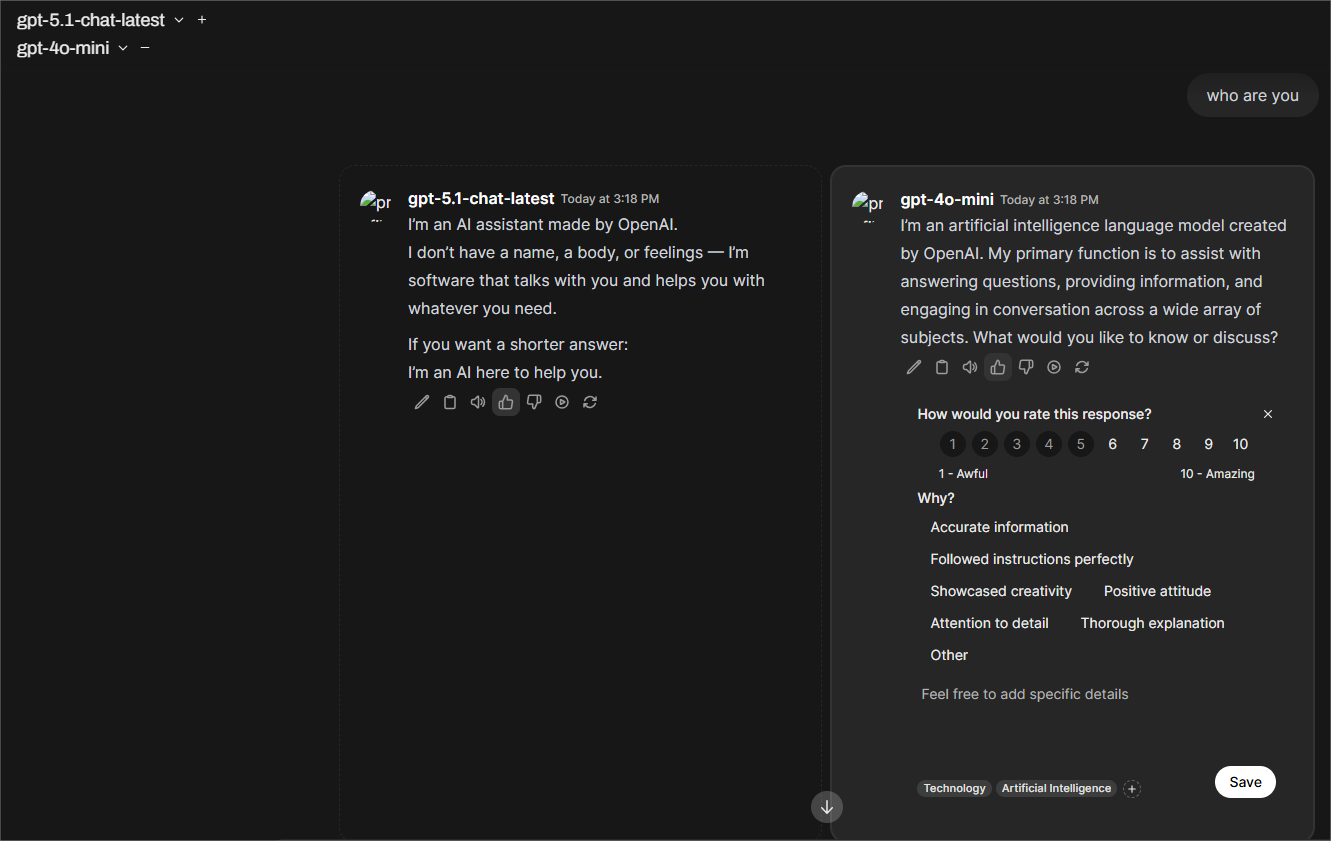
Model & Template Comparison
The Compare feature allows you to evaluate multiple models and templates under the same conditions, making it easier to assess quality, relevance, and performance.
From the Compare section, you can:
-
Run Side-by-Side Comparisons:
Submit a single question or prompt and generate responses from multiple selected models and templates simultaneously. -
Score Results:
Evaluate each response using a grade from 1–10, enabling quick quantitative comparison. -
Add Comments:
Record qualitative feedback, observations, and reasoning for each model’s output. -
Identify Best-Fit Models:
Compare tone, accuracy, structure, and usefulness to determine which model or template best suits your use case. -
Review Evaluation History:
All scores, comments, and comparative analysis are stored and can be revisited in the Evaluation section for further review and tracking over time.
The Compare feature helps teams make data-driven decisions when selecting models or templates by combining structured scoring with human judgment.